

Translate:

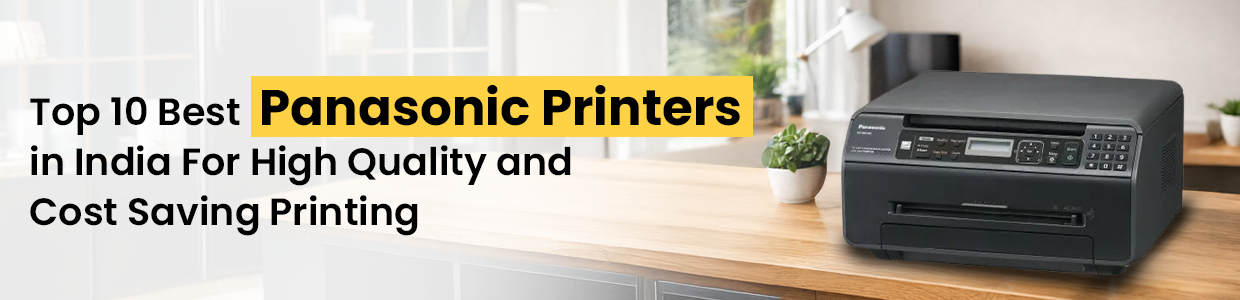
Top 10 Best Panasonic Printers in India For High-Quality, Cost-Saving Printing
Panasonic printers are known for their durability, efficient laser output, and low running costs, making them great choices when you need crisp documents without frequent cartridge replacements. Panasonics laser and multifunction lineup suits both home and office needs.
In this blog, we have rounded up 10 of the best Panasonic printers available in India-from budget multifunction models to robust workhorses for high-volume printing.
Our Top Picks: Panasonic Printers in India
1. Panasonic KX MB 1900SX Multi Function Printer
Best for: Home and small office use
Key features: All-in-one laser (print/copy/scan), compact design, USB connectivity
Why buy: Affordable multifunction performance with reliable monochrome printing-ideal for everyday documents and reports.
2. Panasonic KX-MB 1500 Multi-Function Printer
Best for: Entry-level office printing
Key features: Laser printing plus copy and scan in one, USB interface
Why buy: Simple multifunction features at a budget price point; great for basic office workflows.
3. Panasonic KX-MB262CX Print Copy Scan
Best for: Small businesses or workgroups
Key features: Print, copy and scan in one unit
Why buy: One of the most cost-effective Panasonic multifunction devices-good entry choice for offices with document handling needs.
4. Panasonic KX-MB772 Multi-Function Monochrome Laser Printer
Best for: Budget-conscious offices
Pros: Includes automatic document feeder, decent print & copy speed
Why buy: Combines print, scan and copy with good everyday performance.
5. Panasonic DP MB300 Multi-Function Color Laser Printer
Best for: Color printing needs
Pros: Handles both black/white and color prints, multifunction features
Why buy: Larger paper tray and ADF make it suitable for offices that handle mixed document types.
6. Panasonic DP MB320 Multi-Function Monochrome Laser Printer
Best for: High-demand document printing
Pros: Strong build and capacity for heavy printing loads
Why buy: Excellent choice for SMEs that need frequent printing and copying.
7. Panasonic KX MB2010 Multi-Function Color Laser Printer
Best for: Office color printing
Pros: Reliable Panasonic quality with color output
Why buy: Balances color capability and cost for professional documents.
8. Panasonic DP 8045 Multi-Function Color All-In-One Printer
Best for: Mid-range business printing
Pros: Versatile all-in-one design
Why buy: Good mix of features at a competitive price point.
9. Panasonic DP 8060 Multi-Function Color All-In-One Printer
Best for: Medium-volume organizations
Pros: High reliability and multifunction features
Why buy: Balanced performance for offices that also need scanning/copying regularly.
10. Panasonic KX-MB2130 Series Printers
Best for: Duplex and cloud printing needs
Pros: Often supports 2-in-1 duplex printing (saving paper), cloud/mobile print support
Why buy: Designed to deliver both cost and time savings-ideal for businesses mindful of printing expenses.
Why Choose Panasonic Printers in India?
Low running costs: Panasonic`s laser printers are typically more economical than inkjets for text-heavy work.
Long-lasting output: Laser technology means toner lasts longer with consistent quality prints.
Multifunction capabilities: Many models offer printing, scanning, and copying in one unit.
Easy maintenance: Simple consumables and robust build help reduce downtime.
Buying Tips: How to Choose the Right Printer
Here is how to decide which Panasonic printer suits you:
1. Know Your Print Volume
Low volume: Compact models like KX MB1500 or MB1900 are ideal.
Medium & high volume: DP MB320 and DP MB300 handle larger daily workloads.
2. Look for Multifunction Features: If you need scan/copy/fax, prioritize multifunction devices.
3. Color vs Monochrome
Black & white documents: Monochrome lasers are cheapest to run.
Presentations & visuals: Color laser models are worth the extra cost.
4. Connectivity
Check if you need USB, network or mobile/cloud printing for flexible use.
Final Thoughts
Panasonic printers remain a dependable choice in India for users who want quality prints without burning through ink. Whether its everyday office documents, school assignments, or business reports, there is likely a Panasonic model that fits your needs and budget.
If you want specific price comparisons, features side-by-side, or recommendations based on your exact printing volume and usage pattern, just let me know!

Top Sellers


 +91 9999049135

