

24 hrs Delivery
Electrical & Appliances
Office Supplies
Industrial Tools
Agri & Gardening
Medical & Lab Supplies
Safety Supplies
Construction Materials
Automotive
Packaging & Material Handling
Computer Mouse
Showing 40 out of 529 Products
Sort By:

By: Logitech
Available on Request
₹3,561
Sniper Button/Dpi Shift: Shift DPI on the Fly - Perfect
Dpi Cycle: Customize Up to Five Different DPI Settings in...
Sensor technology: Advanced Optical Tracking
Wireless technology: Advanced 2.4 GHz wireless connectivity
By: Logitech
Available on Request
₹559
Power-Saving Features & Easy Navigation
Ergonomic Design
By: Logitech
Available on Request
₹1,129
Less Noise, More Focus
Comfortable, Compact Design
By: Zebronics
Available on Request
₹411
Crafted with an Ergonomic in-ear Design & These Earphones Offer
You Can Enjoy Extended Listening Sessions without the Discomfort, Its
High Speed Optical Mouse Plug-N-Play USB Mouse
Ergonomic & Comfortable Design & Convenient for Both Left &
By: Cosmic Byte
Available on Request
₹719
Adjustable Backlight Brightness & Speed
Injection Molded Double-Shot Color Keycaps
Receiver Can Be Hidden in The Mouse Shell
Button Life: 3 Million Times
Nano receiver Dimension: 6.6x14.4x18.7 mm
Battery: 1 x AA
By: Rapoo
Available on Request
₹1,199
Multi-Device Wireless Bluetooth Mouse & DPI & Silent Mouse
Magnetic Keyplate, Scroll Button & 5 Million Keystrokes
By: Zebronics
Available on Request
₹973
4 Buttons, Comfortable & Ergonomic
Dual Mode & Silent Operation
By: Zebronics
Available on Request
₹765
3 Buttons & Receiver Hiding Capability
Plug and Play Functionality
With Bluetooth 5.1 Wireless Connectivity
Compact & Portable
Plug & Play
By: Portronics
Available on Request
₹361
Nano Receiver
Vertical Mouse
Smooth Rubber Scrolling Wheel
Textured Grip for Control
By: Asus
Available on Request
₹2,076
Ergonomic Design with Rubberized Sides for Comfortable Long Term Use
By: Coconut
Available on Request
₹174
By: Philips
Available on Request
₹1,273
By: Portronics
Available on Request
₹1,323
Overall Shape is Full with 3D Ergonomic Design
It can Effectively Reduce the Hand Fatigue
Wireless, Bluetooth, Ergonomic & Laser
2.4GHz Wireless Mouse with Ergonomic Design
The Roller Button Can Be Used For Fast Browsing Up/Down,...
The Designed Mouse Fits Comfortably in Your Hands & is
By: Portronics
Available on Request
₹1,804
Adjustable DPI
Nano Receiver
Smart energy-saving
Advanced optical sensor technology
By: Logitech
Available on Request
₹2,049

By: Portronics
Available on Request
₹301
Ergonomically Designed to fit Naturally in your Hand, Reducing Wrist...
Delivers a Seamless 2.4 GHz Wireless Connection for Uninterrupted Performance
Sleep & Awake Technology
You Get Better Cursor Control for Precise Tracking & Text
Easily Connect This Mouse to a PC or Laptop via

By: Foxin
Available on Request
₹359
Type-C Charging & Ergonomic
Rechargeable Battery & Dual Connectivity
By: Portronics
Available on Request
₹361
Vertical Mouse
Adjustable DPI
By: Coconut
Available on Request
₹563
5 Milestone Led Colour Options: Customize Your Experience with Five
Designed to Conserve Battery Life During Idle Periods for Extended
Plug & Play
Over 95% Noise Reduction
USB 3D Optical Mouse
Ergonomic Design that it can be used with left or
Battery Status Indicator
On/Off Switch
Hang on, Loading More

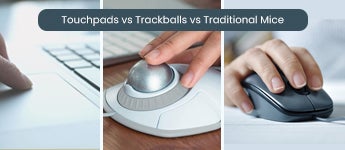

Buy the Best Computer Mouse to have Ultimate Precision and Comfort
A Computer mouse is one of the most important parts of computer hardware. With a computer, a mouse is necessary, but people also choose them with laptops to make the control much easier and faster. They are easier and more comfortable than touchpads. The mouse is important for various tasks, like dragging the cursor to perform functions like clicking or tapping on the screen. Nowadays, it is way more common to use laptops and computers. If you are looking for the mouse online but cannot find the right one, then Moglix has you covered. We have a collection of pc mouse of all types, shapes, and designs from popular brands. Including- Logitech, HP, Zebronics, and more. You can explore your options and shop conveniently on our platform.
Types of Commonly Used Mice for PC and Laptop Users
These are the following common type of computer mouses and their benefits-
Wired mouse:
These types of mouse have a wire that you need to connect to your laptop or PC through a USB port. It works quite fast since information is transmitted through the cable. With wired mouses you will have a lot of accuracy in operations. Due to the wire connection, it does not run out of battery.
Wireless Mouse
Another type of wireless mouse that uses radio signals to transmit information. In comparison with the wired mouses, wireless ones will offer you much convenience and flexibility. They give you clutter free environment and keep your desk organized. But it can be slower in the process
USB Mouse
USB mouse comes in both wired and wireless options. With the wired model, you will need to plug the cable into the USB port on the PC. Whereas, wireless mouse will involve a transmitter plugged into the port. As per your preference or convenience, you can choose any of the USB mouse.
Ball Mouse
Another type of computer mouse is the “Ball Mouse” that has a rubber ball underneath it. They are used to move the mouse and the ball rolls, and the sensor inside will detect the direction and speed. This allows it to move the pointer on the screen. Ball mouses were previously common, but nowadays they are replaced by modern technology.
Laser Mouse
A laser mouse is a type of computer mouse that uses a laser beam instead of an LED light to detect movement. They are more accurate and sensitive than a regular optical mouse. A laser mouse can work on almost any surface.
Bluetooth Mouse
The Bluetooth mouse is similar to a wireless mouse, but slightly different. With a wireless mouse, you need a dongle to connect to the PC. But the Bluetooth mouse works on a Bluetooth connection with a PC or a laptop. They offer you more flexibility and can connect with many devices.
Touchpad Mouse
This type of computer mouse is also called a trackpad. A touchpad mouse can control the cursor on the screen by moving fingers over the touchpad on the laptop. It is installed on the laptop, and you need to use your fingers.
Some of the other types include- Optical mouse, Wheel mouse, and Blue Track computer mouse. There are other types as well that look specifically designed for gaming, vertical or stylus.
Things to Consider Before Buying a PC Mouse
Wired or wireless: You need to decide if you want to go for a wired or a wireless mouse. While wired mice can be connected through a port on the computer, wireless models use various methods of connection.
Price: The cost varies according to the programmable buttons and other features of the mouse. You should understand your purpose and the limit of investment you want to make.
Responsiveness: The response time taken by the time to understand gestures is also crucial. While wireless mice have slower responsiveness, wired mice work faster.
Purpose: If you are a standard PC user who needs a mouse for basic tasks, you can go for the simpler ones. But if you are into fields like gaming or editing, wherein you need computer mice for complex tasks, you should go through the advanced ones.
Ergonomic Mice -These are comparatively more expensive but it is equipped with various designs like fingertip grip, palm grip, and claw grip to suit your comfort.
DPI- A mouse should have at least 1200 DPI (dot per inch) for more accurate movements and better control.
Count on Moglix for a Varied Collection of Brands of Mice for PC or Laptop
- Affordable and promising, Logitech is a top seller of computer mice.
- You can easily choose a computer or laptop mouse from the offerings of Logitech, including a variety of USB mice, optical mice, etc.
- The models often have optical tracking.
- The offerings of Quantum stand for the comfort of desktop usage.
- They are stylishly designed and made in a way that you can comfortably move them around.
- They have advanced performance.
- The offerings of Rapoo are in high demand on Moglix.
- The silent multimode wireless mouse is a great option. It has an ergonomics design and produces negligible noise, making it the perfect silent mouse.
- The plug-and-play USB mouse from Foxin is an affordable model that stands for ease of operation.
- It gives you a comfortable grip and has an ergonomic design.
Other brands to explore on Moglix are HP, Dell, Zebronics, Portronics, Prodot, etc.
Computer Mice by Price Range on Moglix
Computer and Laptop Mice Under Rs. 400 to 500
For basic and simple use, you can choose a computer mouse that comes within the budget of Rs. 400 to Rs. 500. You can find an affordable and reliable pc mouse in this price point, but you cannot expect a long lifespan. Some models in this budget offer seamless performance and a comfortable design.
Computer Mice Under Rs. 1000 to 2000
Moglix.com offers a large selection of feature-packed computer mice priced between Rs. 1000 and Rs. 2000. From wireless connectivity to customisable buttons, these mice provide the expanded capability to match your individual needs while remaining affordable.
Computer Mice Under Rs. 3000 to 4000
Upgrade your budget and computer experience with a premium quality computer mouse. In the budget of Rs. 3000 Rs. 4000, you get an excellent build and a comfortable mouse that offers smooth performance. These modern mice have advanced features and high DPI sensors. While some will come with ergonomic designs and RGB illumination that enhance the performance. For professional gaming and to increase productivity, you can choose a computer mouse in this price range.
Buy The Most Efficient and Ideal Mouse for a PC From Moglix
Discover the perfect balance of precision, comfort, and performance with our top-rated PC mouse collection at Moglix. Whether you’re a professional, gamer, or casual user, our mice are designed to enhance your computing experience. Featuring cutting-edge technology, ergonomic designs, and reliable connectivity, these mice offer smooth navigation, responsive clicks, and long-lasting durability.
Choose from a variety of wired and wireless options, with additional features like customizable buttons, adjustable DPI, and seamless compatibility with all major PC systems. At Moglix, we provide only the highest-quality mice that guarantee productivity, comfort, and style. Shop now and enjoy the ultimate user experience, backed by Moglix’s trusted customer service and fast delivery.
Frequently Asked Questions about Computer Mouse
How do I connect a Bluetooth mouse to my computer?
Go to your computer’s Bluetooth settings, turn on your mouse, and pair it once it appears in the device list.
What is DPI in a mouse and why does it matter?
DPI (dots per inch) measures sensitivity. Higher DPI means the cursor moves faster. Gamers and designers often adjust DPI for precision.
Can I use a gaming mouse for everyday work?
Yes, gaming mice are often more comfortable and responsive, making them suitable for productivity tasks too.
How do I choose the right mouse for my hand size and grip style?
Choose a mouse that fits your palm comfortably. For palm grip, opt for larger mice; for claw or fingertip grip, smaller, lightweight mice work better. Ergonomic designs are ideal for long usage.
Which type of mouse is best for gaming?
Gaming mice typically offer high DPI (dots per inch) sensitivity, customizable buttons, faster response times, and ergonomic designs. Look for brands like Logitech G-series, Razer, or SteelSeries.
What is the difference between a wired and a wireless mouse?
Wired mice connect directly to your computer via USB and offer consistent performance with no need for batteries. Wireless mice use Bluetooth or a USB receiver, offering more freedom of movement but may need recharging or battery replacement.
Which type of mouse is best?
The best mouse type depends on your needs. Optical mice offer precision on most surfaces, while laser mice excel on challenging textures. For gaming, high-DPI optical or laser mice are ideal.
Top Selling Computer Mouse Price List in India
This data was last updated on 10/14/26.

Great Value
Most popular brands with widest range of selection at best prices.

Nationwide Delivery
Over 20,000 pincodes serviceable across India.

Secure Payment
Partnered with India's most popular and secure payment solutions.

Buyer Protection
Committed to buyer interests to provide a smooth shopping experience.

365 Days Help Desk


MOGLI LABS (INDIA) PRIVATE LIMITED © 2026 Moglix.com. All Rights Reserved.