

24 hrs Delivery
Electrical & Appliances
Office Supplies
Industrial Tools
Medical & Lab Supplies
Agri & Gardening
Safety Supplies
Automotive
Construction Materials
Packaging & Material Handling


Hover to Zoom
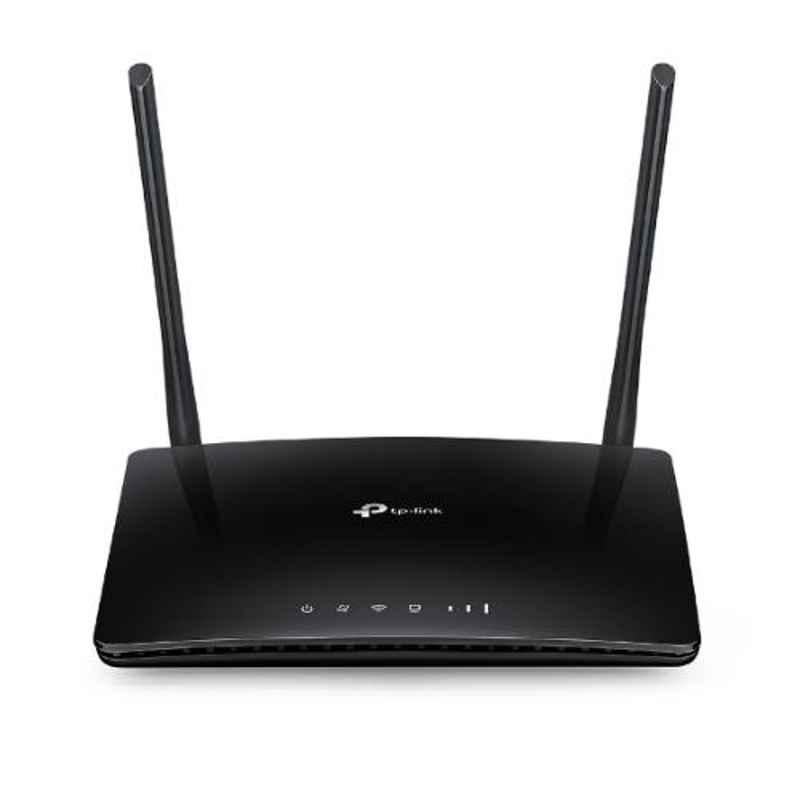
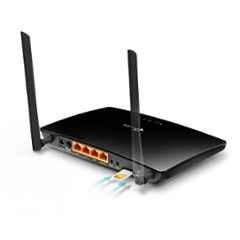
TP-Link TL-MR6400 300Mbps Wireless N 4G LTE Router
(22 Reviews)
₹4,784 (Incl. of all taxes)
₹4,054 + ₹730 GST
MRP ₹8,052 40% OFF
Moglix Insights
TP-Link is top brand in wifi access point routers, preferred by 79% of the users
21% of the users prefer wifi access point routers in ₹4000-5000 price range
About This Product
Key Features
Customer Care Number: 1800 209 4168 & Email Id: Support.in@tp-link.com.
Latest Version Available.
Provides Wi-Fi Connectivity for Up to 32 Devices Simultaneously.
300 Mbps Wireless Speed Ensures Smooth Browsing, Streaming & Online Activities.
Easy Plug & Play Setup Makes Installation Simple with Minimal Configuration Needed.
4G LTE SIM Slot Allows Instant Internet Access without the Need for a Fixed Broadband Line.
Show All Key Features
Product Specifications
Brand | |
Antenna | V3/Apac: 2 Internal 4G LTE Antennas V2/V1: 2 Detachable 4G LTE Antennas |
Certification | CE & RoHS |
Current | 1 Amp |
Customer Care Number | 1800 209 4168 |
Dimensions | 202x145x34 mm |
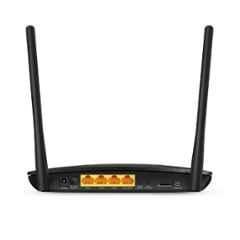
Interface | 3 LAN, 1 LAN/WAN Ports & 1 Micro SIM Card Slot |
Model No | TL-MR6400 |
Network | 1 2.4GHz Guest Network |
Network protocols | Supports IPv4 & IPv6 |
Number of Buttons | Reset Button, Wireless/WPS On/Off Button & Power On/Off Button |
Operating Humidity | 10-90% Non-Condensing |
Operating System Version | Microsoft Windows 98SE, NT, 2000, XP, Vista or Windows 7, 8, 8.1, MAC OS, NetWare, UNIX or Linux Internet Explorer 11, Firefox 12.0, Chrome 20.0,Safari 4.0 browsers or higher, or other Java-enabled browsers SIM Card |
Operating Temperature | 0-40 deg C |
Signal Rate | 300 Mbps at 2.4 GHz |
Speed | 300 Mbps |
Standards | IEEE 802.11b/g/n 2.4 GHz |
Storage Humidity | 5-90% Non-Condensing |
Storage Temperature | -40 to 70 deg C |
Transmit Power | CE: < 20 dBm |
Voltage | 12 V DC |
Warranty | 3 Years |
Country of origin | China |
Manufacturer Details | TP-Link, TP-Link Corporation, South Building, No.5 Keyuan Road, Central Zone, Science & Technology Park, Nanshan, Shenzhen, P.R. China |
Packer Details | TP-LINK India Private Limited, Green Industrial Park, Dongri Pada, Poman, Kaman-Bhiwandi Road, Vasai East, Palghar, Maharashtra 401208 |
Importer Details | TP-Link Corporation, South Building, No.5 Keyuan Road, Central Zone, Science & Technology Park, Nanshan, Shenzhen, P.R. China |
Common/Generic Name | Router |
Dimensions LxWxH | 202x145x34 mm |
Weight | 599 g |
Show All Specifications
Product Details
TP-Link offers the TL-MR6400 APAC Version Wireless N 4G LTE Router that delivers high-speed internet connectivity of up to 300 Mbps. If you need a reliable wireless router that performs consistently without interruptions, this model is a dependable choice. This Wi-Fi router is an ideal solution for users who require stable internet for individual use as well as for multiple users simultaneously. Its high-power independent amplifiers provide stronger signal output compared to standard routers, ensuring wider coverage and improved performance. Designed for convenience, it features a built-in SIM card slot, allowing quick internet access without the need for fixed broadband connections. Suitable for homes, small offices, and remote locations, it supports smooth browsing, streaming, video calls, and online work. Easy plug-and-play setup makes installation simple, while its sturdy build ensures long-term reliable operation in daily usage scenarios, even during extended hours of continuous network usage.
Browse through the extensive list of WiFi Access Point Routers at Moglix. Shop online for other TP-Link WiFi Access Point Routers. available at Moglix in the lowest price range.
Read More
TP-Link TL-MR6400 300Mbps Wireless N 4G LTE Router
Verified Purchase
Dhara
January 12, 2026
Remarkable Stability
Connection is remarkable. It stays solid-as-a-rock even with 10 devices connected.
Verified Purchase
Jinal
January 4, 2026
Magnificent Design
Design is magnificent and compact. Fits expertly on any desk.
Frequently Asked Questions
Displaying Questions 2 / 3
Q1:How to connect with jio 4g?
Ans:
Open the router connected via lan card on browser, default is 192.168.1.1, default pwd is admin, Under basic click Internet option, create dialup setting, profile name "jionet", PDP "ipv4", APN type "static", APN "jionet", username and password blank, Authentication none. Save and reboot.
Q2:I don't have broadband connection.have a pc,smartphone and a 3g dongle.can I use this for ceating wi-fi hotspot and connect to my pc at the same time?
Ans:
Yes you can do that. Connect 3G dongle to USB port, your PC through Ethernet/WLAN (RJ45) port and also create a Hot Spot simultaneous. You can browse internet on PC through Ethernet cable and same time connect your mobile devices to Wi-Fi Hotspot.
VIEW 1 MORE FAQs
₹4,784 (Incl. of all taxes)
₹4,054 + ₹730 GST
MRP ₹8,052 40% OFF

Great Value
Most popular brands with widest range of selection at best prices.

Nationwide Delivery
Over 20,000 pincodes serviceable across India.

Secure Payment
Partnered with India's most popular and secure payment solutions.

Buyer Protection
Committed to buyer interests to provide a smooth shopping experience.

 +91 9999049135


MOGLI LABS (INDIA) PRIVATE LIMITED © 2026 Moglix.com. All Rights Reserved.