

24 hrs Delivery
Electrical & Appliances
Office Supplies
Industrial Tools
Agri & Gardening
Medical & Lab Supplies
Safety Supplies
Automotive
Construction Materials
Packaging & Material Handling
Scanners
Showing 40 out of 103 Products
Sort By:

Paper Protection Function to Protect Documents from Damage
Backlit Lcd for Easy Operation Viewing
By: Canon
Available on Request
₹31,069
60-sheet ADF Supports Efficient Batch Scanning
Scans up to 30 Pages Per Minute for Fast Document
By: Epson
Available on Request
₹72,521
Customer Care Number: 1800 123 001 600 & Email Id:
Canon customer care number - whatsapp: 91085 10853, phone number:
Versatile 2-way scanning
By: Epson
Available on Request
₹32,939
ISIS Driver Support
Text Enhancement
Fast & Reliable & Superb Image Processing
Comfortable & Versatile
50 Sheet Mixed Batch Document Capacity from Long Paper to
Free Premium Software Bundle, Including Abbyy Finereader Sprint & Nuance
Scanning & Routine Tasks are Faster, Easier with Pre Configured,...
Quickly Scan a Large Stack of Two Sided Documents &
High Accuracy: Utilizes Advanced Iris Recognition Technology for Precise &
Contactless Operation: Allows for Contactless Scanning, Promoting Hygiene & Reducing
By: Epson
Available on Request
₹241,179
Customer Care Number: 1800 123 001 600 & Email Id:
Scan Various Types of Documents with a Single Scanner, Straight...
Skew Reducer, Fully Utilize Allocated Space with Its Flexible Design,...
By: Fujitsu
Available on Request
₹37,499
Space-Saving Design for Limited Spaces, Optimized Image Data with Paperstream...
Scan Quickly with the ADF, Scan Various Documents with a...
This Large Format Book Scanner is an Essential Tool for
Whether You Need to Digitize Newspapers, Intricate Drawings & Substantial
By: Honeywell
Available on Request
₹9,999
Automatic calibration and table updates
Available SDKs: FPCaptureAccess; FPCaptureExpress
Prevent Multi-Feed Errors with Reliable Feeding Functions, Skew Reducer &
Independent Side Guides, Scan Any Document with Just One Scanner,
Reliability of Accurate Feed & Protect Documents
Advanced Software for Higher Productivity
Space-Saving Design, Simple & Easy-to-Use
50 Sheet Automatic Document Feeder
It captures images and verifies fingerprints with high speed
Small fingerprint data template size
Save Time & Improve Performance with Customized Workflows
HP Brand Aligned Authorised Partner
By: Epson
Available on Request
₹185,184
Customer Care Number: 1800 123 001 600 & Email Id:
Easy to Use
Upgraded Feeding Mechanism
Compact & Lightweight Design, Ideal for Mobile Use
Canon Customer Care Number - Whatsapp: 91085 10853, Phone Number:
Greater Productivity & Advanced Optics
Exclusive Dual Lens System
By: Epson
Available on Request
₹63,899
Scan Sheets Up to 8.5 X 40 Inches, Scan Directly
Document Capture Pro Software Included
Customer Care Number: 1800 123 001 600 & Email Id:
Best Experience with Scan snap Home
Vi Technology with Convenience & Quality
By: Brother
Available on Request
₹33,459
Mid Volume Scanning, Triple Layer Security & Increases Productivity
Compact, Versatile & Convenient
Customer Care Number: 1800 123 001 600 & Email Id:
By: Ace Instruments
Available on Request
₹10,286
The Range is Programmable from -999 to +9999 by Using
Clean Room Scanner Displays are True 4 Digit Red LED
Black & White(Scanning): 25 Ppm/50 Ipm
Scanning Sensor Unit: Cmos Cis 1 Line Sensor
By: Epson
Available on Request
₹41,319
Customer Care Number: 1800 123 001 600 & Email Id:
By: Epson
Available on Request
₹60,899
Generate Searchable Pdfs & Editable Office Documents
PC-free Scanning for Easy Sharing and Collaboration
By: Fujitsu
Available on Request
₹299,999
Connect Business Workflow with Paperstream IO & Paperstream Capture, Streamline...
Advanced Software Improves Workflow Before & After Scanning, Fully Utilize...
By: Fujitsu
Available on Request
₹50,479
Versatile Scanning with Space-Saving Design & Stress-free Usability, Return Scan...
Fast, Reliable, & Hassle-free Scanning for a Better Customer Experience,...
Ultrasonic Double Feed Detection Sensor, iSOP (Intelligent Sonic Paper Protection),
Hang on, Loading More
Reviews for Scanners
Most Helpful Review
Awesome Stuff...!!!
Awesome product straight from Vietnam..!!
Suyash Sharma |
Most Recent Review
Awesome Stuff...!!!
Awesome product straight from Vietnam..!!
Suyash Sharma |
Most Helpful Review
Epson V39 II
Quick response.. timely follow-up and prompt delivery. Also, the product was received in a good condition.
Vaibhav | Sep 28, 2023
Most Recent Review
Epson
Nice Product
Axom | Feb 4, 2026
Most Helpful Review
Amazing Product
Very good product
Biswajit Sarkar |
Most Recent Review
Amazing Product
Very good product
Biswajit Sarkar |
Most Recent Review
Exceeded my expectation
Wow, I couldn't be happier with this product, it exceeded my expectations in every way.
Ramandeep | Feb 26, 2024
Most Recent Review
Superb experience
Superb customer service, highly recommend.
JJ singh | Mar 21, 2024
Buy High Quality Scanners for Documents on Moglix
Document scanners are most commonly used in offices and educational institutions for converting physical information into digital copies. These scanners offer high-quality images of the documents so that every letter can be seen clearly. Moreover, some higher models have wireless connectivity options like Bluetooth and Wi-Fi, which makes sending documents through a smartphone easy.
What is a Scanner?
A scanner is an electronic device that uses bright light to scan documents and a photo-sensitive sensor that captures the image on the documents. With this process, users can convert physical documents into digital copies. There are various types of scanners available in the market that have different scanning methods and resolutions.
Types of Durable Scanning Machines Available
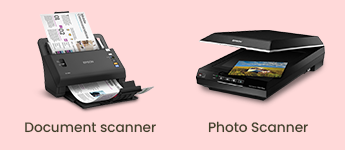
Document Scanners
The main purpose of document scanners, often called sheetfed scanners, is to quickly scan papers of various sizes. This is the scanner to utilize if you need to scan thousands of pages every day. It can scan a large number of pages per day and has built-in features that make scanning simple and efficient. More features cost more money, which is why a document scanner costs more. One feature of this gadget is duplex scanning, which uses less room and offers good quality. Instead of scanning books or sheets, this scanner works best for scanning pages.
Photo Scanners
Photo scanners are scanners made especially for scanning artwork, photos, and other visual media. The device's high resolution and colour depth are its main features. Some picture scanners have built-in image editing software, which has the benefit of enhancing image quality. In comparison to other scanners, a scanner with image editing software can be unnecessarily expensive.
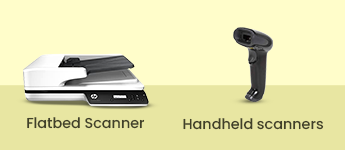
Flatbed Scanners
A flatbed scanner is similar to a copy machine, with the exception that it stores the document's file in memory rather than generating a paper copy. The most common and commonly applied kind of scanner available is this one. An item can be scanned and then saved on a storage device, displayed on a computer screen, printed, faxed, attached to an email, incorporated in another document, and made available for viewing by the public on a website or image community. Flatbed scanners are a great option for both homes and businesses since they can scan practically any sort of document or image because of their size and ability to handle all paper sizes. High-speed scanning, possible network integration, wireless scanning, and other advantages of this flatbed scanning device.
Handheld Scanners
While all of the scanners we've discussed so far are large and bulky, necessitating storage space, handheld scanners are small and portable, allowing you to carry them in your pocket. A portable scanning device is a small rod-shaped device that can be used with your hand. It is not similar in construction design to others but serves the same purpose. This diagram depicts the various types of scanners that are currently in use. It determines the outcome by focusing on the subject, reading it with light sensors, and displaying the result.
OMR Scanners
These devices read marks on paper in specific areas. Hand-drawn marks, such as small circles or rectangles, can be recognized with pens or pencils. A person makes these markings on a form, such as an exam, survey, questionnaire, or answer sheet. Before evaluating a test paper sheet, the Optical Mark Recognition machines read the answer key sheet to record correct answers based on light patterns. After that, the OMR device reads the rest of the document and compares the light patterns to the answer key sheet.
Barcode Scanners
A bar code is a series of thin lines that represent a number. To input data from bar codes, a barcode reader, also known as a barcode scanner, is used. The majority of items in stores have bar codes. Bar code readers work by shining a light beam on the bar code lines and measuring the amount of light reflected.
Factors to Consider When Purchasing a Document Scanner
Image Sensor
CCD (Charge Coupled Device) or CIS (Contact Image Sensor) image sensors are commonly used in modern scanners. CIS is a more recent innovation for low-cost entry-level consumer scanners. CIS-based scanners are smaller, less expensive, and use less power than CCD-based units, but they produce slightly lower-quality images.
Resolution
The resolution specification of a scanner helps to distinguish it from the competition. The resolution shows the number of pixels that a scanner can capture, which is dots per inch (DPI). Best quality scanners can capture more information from an image than affordable scanners, providing more detail and image quality.
Scanning Speed
The importance of a scanner's speed is determined by how frequently you intend to use it. Speed may not be an issue if a scanner is only used once or twice a day, as is typical for most home/personal use. Of course, the situation can be completely different for those who are constantly acquiring images or documents. In general, scanning resolution, as well as other scanning settings such as colour depth, have a significant impact on scanning speed.
Color Depth
The bit depth refers to the amount of information that a scanner can record per pixel. The greater the bit depth, the more colour/grey gradations the scanner can record, resulting in higher image quality. Because more information can be stored per pixel, a higher bit depth also means a larger file size.
Budget
A premium option will always be available within your budget, but you must do your research and select one built by a reputable company with dependable components and a long warranty.
Reputed Brand
The brand is an important factor to consider because it can affect the quality of the items you buy. When you buy from a well-known and established company, you can expect prompt and high-quality customer service whenever the need arises.
Top Brands in India Offering High Resolution Scanners
Canon Scanners
Canon is a leading provider of digital imaging solutions for consumers, businesses, and industries. It sells cameras, EF lenses, camcorders, printers, scanners, binoculars, projectors, and other items. Canon provides instant and great customer service, so there is no need for you to worry in case of any issues.
Epson Scanners
Epson is a globally recognized brand that offers cutting-edge imaging solutions. It is a global technology company that sells all-in-one printers, professional imaging, projectors, scanners, and other products. After conducting extensive market research, they purchase their raw materials from the most reputable and authorized suppliers.
Startek
Startek is well-known for its expertise in optical scanners, modems, and printer design and development. It provides a diverse range of imaging products, including film scanners and life science products. Startek scanners come in a variety of options and are easy to use. Following a thorough market analysis, the most dependable and well-known vendors are selected to supply the components needed to manufacture Startek scanners.
Fujitsu
Fujitsu is one of the world's largest IT services providers, offering a wide range of technology products, solutions, and services. It provides a wide range of products, including tablet PCs, desktop computers, scanners, printers, servers, storage devices, and many other peripheral devices. Their range of scanners is classy, affordable, and easy to use.
Frequently Asked Questions about Scanners
What should I do if my scanner stops working?
Check that the cable connecting the scanner to your computer is securely connected at both ends. If feasible, try an alternative cable to rule out any problems with the current one. You can also try another USB port on your computer to see whether a malfunctioning port is to blame.
Can I clean a scanner with paper towels?
Paper towels should not be used since they can leave dust on the glass. Avoid using compressed air since it can shove dust under the glass, necessitating the services of a professional cleaner.
What are scanners called?
Scanners are also known as image scanners or optical scanners. They are devices that capture images from physical documents or objects and convert them into digital data.
What are the four functions of scanner?
Scanners capture images or documents, convert them into digital data, allow for editing and manipulation, and enable easy storage and sharing of information.
What are the three types of scanners?
Common scanner types include flatbed scanners for documents and photos, document scanners for high-volume paper scanning, and portable scanners for on-the-go use. Each offers unique advantages for different needs.
What is a scanner and its type?
A scanner is a device that optically scans images, printed text, or objects, converting them into digital data. Common types include flatbed scanners for documents and photos, and portable scanners for on-the-go use.
What is a scanner used for?
Scanners convert physical documents and images into digital files. This allows for easy storage, sharing, and editing of information, streamlining workflows for businesses and individuals.
Top Selling Scanners Price List in India
| Latest Models | Price | Discount |
|---|---|---|
| Fujitsu fi-7160 Color Duplex Document Scanner | ₹61,199 | 32% OFF |
| Canon imageFORMULA 30ppm A4 Desktop Sheetfed Scanner, DR-C230 | ₹31,069 | 37% OFF |
| Fujitsu fi-7460 Sheetfed Scanner | ₹199,999 | 27% OFF |
| Fujitsu SP 1125 Scanner | ₹27,899 | 17% OFF |
| Epson DS-7500 80ipm Flatbed Duplex ADF Work Force Document Scanner | ₹72,521 | 15% OFF |
| Canon DR-F120 Legal Document Scanner | ₹25,299 | 22% OFF |
| Epson DS-410 WorkForce A4 Duplex Sheet-fed Document Scanner, Scan Speed: 26ppm-52 ipm | ₹32,939 | 15% OFF |
| Canon DRM1060 Desktop Sheetfed Document Scanner | ₹139,999 | 17% OFF |
| Brother Network Document Scanner, ADS-2400N | ₹33,499 | 14% OFF |
| HP ScanJet Pro 2500 f1 Flatbed Scanner | ₹27,299 | 23% OFF |

Great Value
Most popular brands with widest range of selection at best prices.

Nationwide Delivery
Over 20,000 pincodes serviceable across India.

Secure Payment
Partnered with India's most popular and secure payment solutions.

Buyer Protection
Committed to buyer interests to provide a smooth shopping experience.

365 Days Help Desk


MOGLI LABS (INDIA) PRIVATE LIMITED © 2026 Moglix.com. All Rights Reserved.